How to share your farm with an agronomist or adviser
Invite your agronomist to one farm in AgriSync. Choose whether they see your SFI records and evidence, approve requests and remove access at any time.
Last checked against gov.uk
- Written by
- The AgriSync team
- Published
- Reading time
- 3 minutes
In short
To share a farm with your agronomist in AgriSync, open Advisers and press Invite an agronomist. Enter the Agronomist's email and read What they will and won't see. Tick the consent box and press Send invitation. They see that farm's crop checks and can leave notes. To let them also see your SFI to-do list and evidence, press Allow compliance and evidence. Remove access takes it all back straight away.
What you need
- Your farm set up in AgriSync
- Your agronomist's email address
Steps
- 1
Open Advisers
In the menu, under SFI, choose Advisers. Then press Invite an agronomist.
- 2
Fill in the invitation
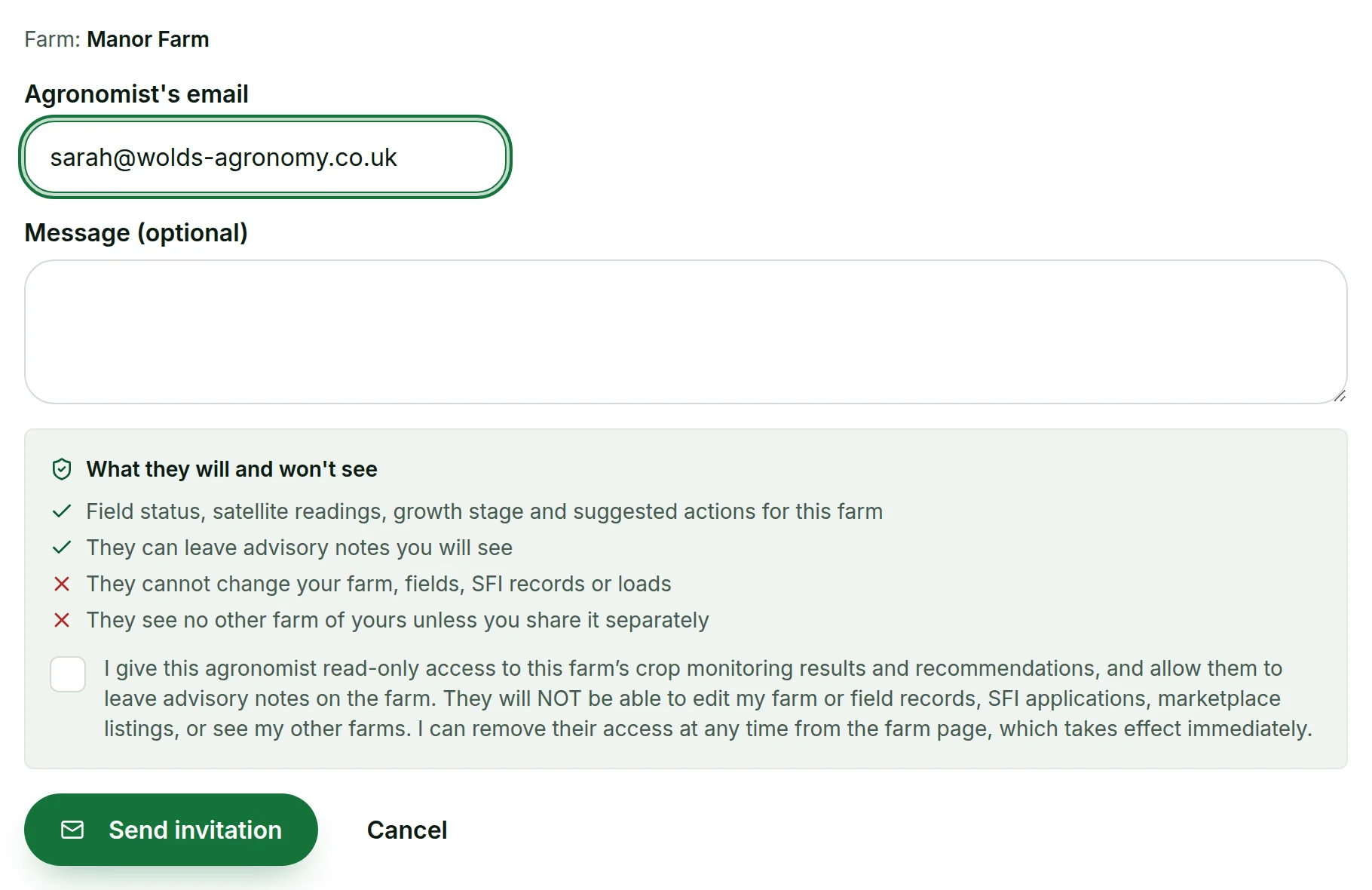
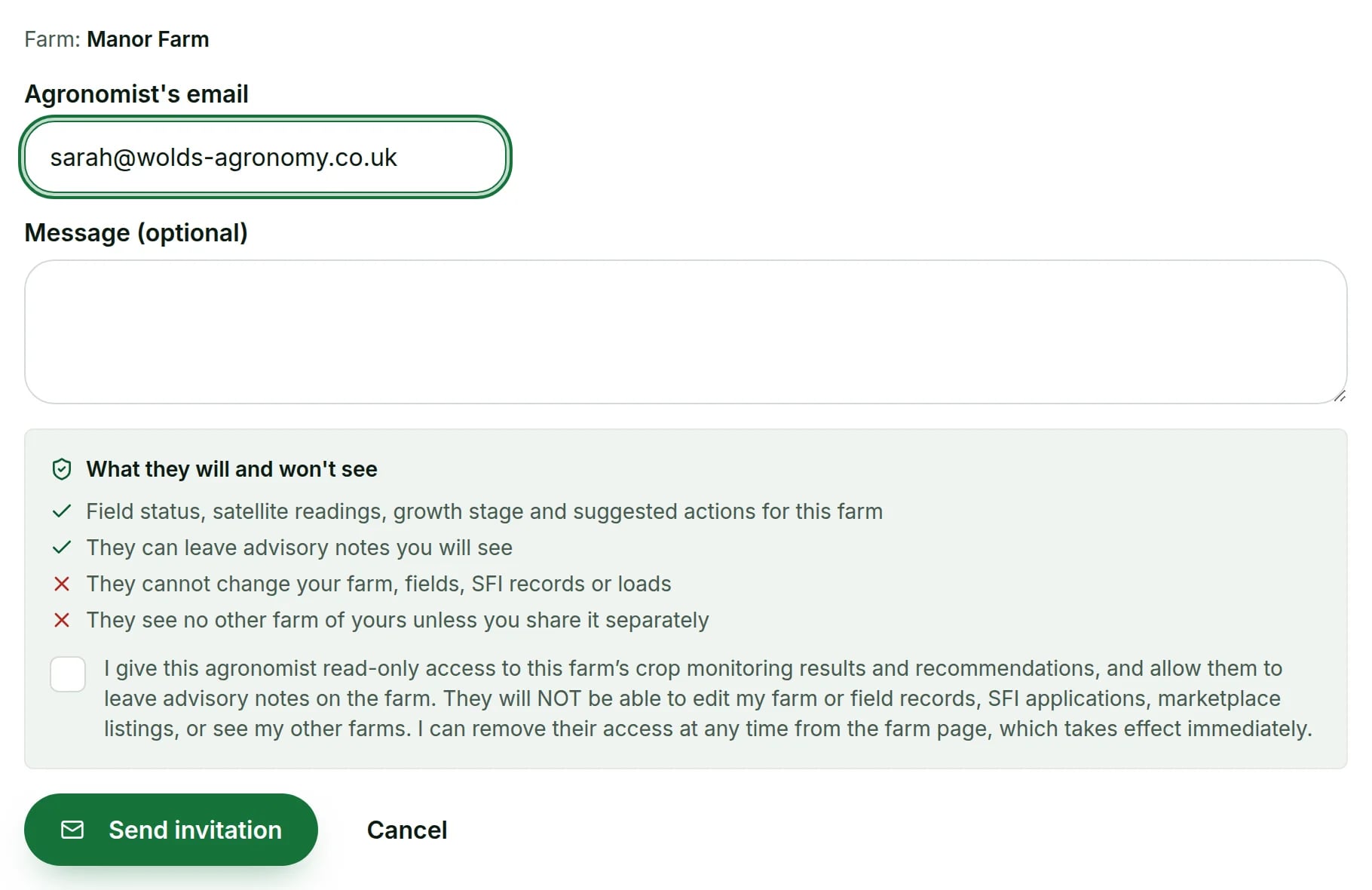
Have more than one farm? Choose the Farm to share. Enter the Agronomist's email. You can add a Message (optional) too.
 Tap to see the whole screen(opens the full-size picture)
Demo farm in the AgriSync test environment. - 3
Read what they will see, and agree
Read What they will and won't see. Then tick the box to say yes.
- 4
Send it
Press Send invitation. Your agronomist gets an email. They see the farm once they accept.
- 5
Approve requests from advisers
An agronomist can also ask you for access. Their request appears under Waiting for your approval. Press Approve or Decline. Nothing is shared until you approve.
- 6
Choose whether they see compliance and evidence
Under Who can see your farm, AgriSync asks if your adviser may also see your SFI to-do list, field checks, agreement actions and evidence. Press What exactly am I agreeing to? to read the wording. Press Allow compliance and evidence to say yes. It is read-only, and they still can't see your SFI payments.
 Tap to see the whole screen(opens the full-size picture)

Demo farm in the AgriSync test environment. - 7
Take access back
Under Who can see your farm, press Stop sharing compliance and evidence to take back just that part. Press Remove access to remove the person altogether. If they haven't accepted yet, press Cancel invite. It works straight away.
 Tap to see the whole screen(opens the full-size picture)

Demo farm in the AgriSync test environment.
What will my agronomist see?
| They will | They won't |
|---|---|
| See field status, satellite readings, growth stage and suggested actions for this farm | Change your farm, fields, SFI records or loads |
| Leave advisory notes you will see | See any other farm of yours unless you share it separately |
| Sign off your IPM or nutrient management plan, and send spray or fertiliser advice | See your SFI payments |
| Only with your separate yes: see your SFI to-do list, field checks, agreement actions and evidence | Upload or delete anything |
Their notes appear on your Advisers page under Notes from your advisers. Plan sign-offs show on your SFI compliance page and in your audit PDF. Advice shows under Adviser advice in Field records. People you shared with before are listed under Past access.
How does an agronomist ask a farmer for access?
Agronomists sign in to AgriSync, in the web app or the AgriSync phone app. They go to Invitations and requests and press Ask a farmer for access. The farmer sees the request under Waiting for your approval. Farms they can see are listed under Farms I advise.
Common questions
Does my agronomist have to pay?
No. Advisers use AgriSync free during early access.
Can my agronomist change my records?
No. They can look, leave notes, sign off plans and send advice. They can't change your farm, fields, SFI records or loads.
Can I let my adviser see my SFI to-do list?
Yes, with a separate yes. Press Allow compliance and evidence on the Advisers page. AgriSync records the wording you agreed to and when. Press Stop sharing compliance and evidence to take it back. Their crop access and notes stay unless you remove them.
How quickly does removing access work?
Straight away. AgriSync tells you: "Access removed. They can no longer see this farm."
Keep going
How-to guides
In AgriSync
Try it on your own farm
Free during early access. Start on your own, or we'll phone you and set up your fields with you.